If you’ve ever spent time designing a beautiful Pinterest pin only to have it sink without a trace, your description is probably the culprit.
Pinterest is not Instagram. It’s not a mood board you post and forget. It’s a visual search engine and like any search engine, it rewards people who understand how to speak its language. That language starts with your PIN description.
This guide covers exactly how to write Pinterest descriptions that attract the right audience, rank in Pinterest search, and convert saves into real website traffic. You’ll get the step-by-step manual process and a faster, smarter method using Claude AI so you can pick whichever fits your workflow. Whether you’re a blogger, e-commerce brand, or content creator, these strategies work in 2026 and beyond.\
Table of Contents
What Is a Pinterest Description and Why Does It Matter?
A Pinterest description is the text that appears below or alongside your pin image. It can be added to individual pins, boards, and your profile itself. While the image draws the eye, the description is what Pinterest’s algorithm reads to understand what your content is about.
Here’s why this matters more than most creators realise:
Pinterest functions as a search engine first. When someone types “easy weeknight dinners” or “boho living room ideas” into Pinterest’s search bar, the algorithm scans pin descriptions, titles, board names, and profile information to decide which pins to surface. A beautiful image with a vague or missing description will lose to a mediocre image with a well-written, keyword-rich description every time.
Beyond search ranking, descriptions influence click-through rates. A description that clearly communicates value (“5-ingredient pasta ready in 20 minutes, get the full recipe”) gives users a reason to tap. A description that just says “yummy dinner” does not.
Pinterest also uses descriptions to power its Smart Feed and home feed recommendations, meaning a strong description doesn’t just help you rank for searches, it helps Pinterest proactively show your content to users who haven’t searched for it yet.
How Pinterest Search Actually Works in 2026
Before you can write great descriptions, you need to understand what Pinterest’s algorithm is looking for.

Pinterest Uses Semantic Search
Pinterest’s algorithm has evolved well past exact-match keyword matching. It now uses semantic understanding meaning it reads your description in context, not just for individual words. It understands that “quick breakfast ideas,” “easy morning recipes,” and “5-minute breakfast” are all related concepts.
This means keyword stuffing listing 20 vague keywords in a row no longer works and can actually hurt your reach. What you need is natural, conversational text that centres on a clear, specific topic.
Pinterest Rewards Relevance and Engagement
The algorithm considers how users interact with your pin after seeing it. If people click, save, and visit your linked page, Pinterest reads that as a positive signal and distributes your content more broadly. Your description plays a direct role here: a compelling description drives clicks, which drives an algorithmic boost.
Descriptions Feed Unified Pins and Product Tags Too
Pinterest has streamlined its creation ecosystem into a singular, unified pin format. Whether you are publishing a high-impact video asset, a multi-image carousel, or a product tag layout, the algorithm relies on your standard pin description as the primary metadata source to categorize your media correctly.
Two Ways to Write Pinterest Descriptions (Pick What Works for You)
There are two solid approaches to writing Pinterest descriptions in 2026:
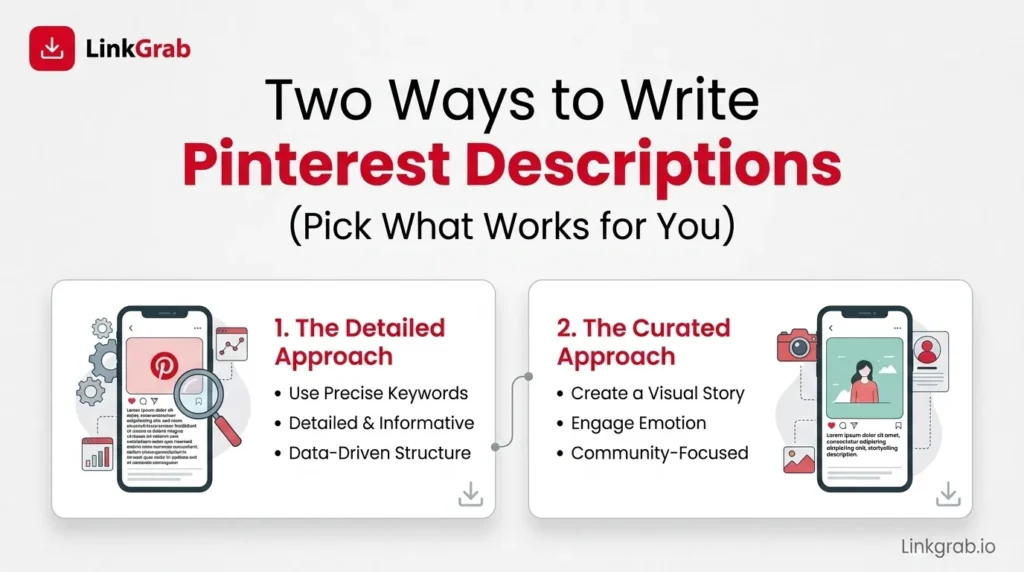
- The manual method write them yourself, following the step-by-step framework below. Best if you enjoy writing or have a very specific brand voice to maintain.
- The Claude AI method use AI to generate keyword-rich, on-brand descriptions in seconds. Best if you’re managing high pin volume, writing isn’t your strength, or you want to move faster without sacrificing quality.
Both methods use the same underlying principles. The difference is time and effort. We’ll walk through both.
Method 1: How to Write Pinterest Descriptions Manually (Step-by-Step)
Step 1: Start With Keyword Research
The single most important thing you can do before writing any Pinterest description is identify the keyword your ideal audience is actually searching for.
How to find Pinterest keywords:
- Use the Pinterest search bar. Type your broad topic and note the auto-suggest options that appear; these are real searches people are making. The coloured keyword tiles that appear in search results are gold: each one is a category of related searches Pinterest has identified.
- Use Pinterest Trends. This free tool shows you which keywords are growing, peaking, or declining on the platform. It’s invaluable for seasonal content planning.
- Study top-performing pins in your niche. Search your topic, look at the pins with the most saves and engagement, and read their descriptions carefully. Note the language patterns and specific phrases.
- Consider your audience’s vocabulary. A home décor pin targeting a mass audience should use “living room ideas,” not “residential interior design.” Match the language of the person who will be searching.
Identify one primary keyword and two to four supporting keywords before you write a single word of your description.
Step 2: Lead With Your Primary Keyword
Pinterest’s algorithm places more weight on the opening words of your description much like a title tag in traditional SEO. Your primary keyword should appear naturally within the first sentence, ideally the first phrase.
Weak opening:
Looking for something fun to do on a rainy Saturday? We’ve got you covered with these craft ideas!
Strong opening:
Easy kids’ craft ideas for rainy days, no glue guns, no mess, just 10 projects your little ones will actually finish.
The second example surfaces the primary keyword (“kids’ craft ideas”) immediately, adds specificity, and gives the reader a clear reason to click.
Step 3: Write for the Human First, the Algorithm Second
Your description needs to answer three questions a reader asks in the first two seconds:
- What is this? Be specific. “Chocolate chip cookies” is better than “dessert ideas.”
- Why should I care? What’s in it for them? Easy, quick, budget-friendly, stunning, foolproof?
- What should I do next? Save this, click for the full recipe, get the free template.
Write in the natural, warm voice your audience responds to. Use second-person language (“you,” “your”) to make descriptions feel personal.
Step 4: Get the Length Right
Pinterest allows up to 500 characters for pin descriptions. In practice, only the first 50–60 characters display in the feed before the “more” option appears. Design your description with this in mind:
- The visible hook (first 50–60 characters): Your primary keyword and clearest value statement go here.
- The expanded description (remaining characters): Add context, secondary keywords, a supporting detail, and a call to action.
For most pins, 150–300 characters hits the sweet spot.
Step 5: Include a Clear Call to Action
Every Pinterest description should tell the reader what to do next:
- For blog traffic: “Get the full tutorial at the link.”
- For products: “Shop this look via the link” or “Tap to see sizes and pricing.”
- For saved inspiration: “Save this for later!”
- For lead magnets/freebies: “Grab the free printable link in the pin.”
Keep CTAs short, direct, and action-oriented.
Method 2: Use Claude AI to Write Pinterest Descriptions (Faster, Just as Effective)
If writing doesn’t come naturally to you or you’re managing dozens of pins a week, Claude AI is the smartest tool available right now for this job. Claude is built by Anthropic and available free at claude.ai. It understands search intent, follows keyword placement best practices, adapts to your brand voice, and produces multiple strong variations in seconds.

This is not a “paste anything and hope” shortcut. When you prompt Claude correctly, the output is genuinely strong, keyword-rich, human-sounding, and ready to use with minimal editing. Here’s exactly how to do it.
Step 1: Open Claude at claude.ai
Go to claude.ai in any browser. The free plan is enough to get started. Claude Pro gives you faster responses and higher usage limits worth it if you’re batching large volumes of pins.
No setup, no downloads. It’s a simple chat interface.
Step 2: Write a Detailed, Specific Prompt
This is the step that determines everything. Claude produces excellent results when you give it clear context. Vague prompts produce vague descriptions.
Copy and customise this prompt template:
Write [number] Pinterest pin descriptions for a [blog post/product/recipe/tutorial] about [your topic].
- Primary Pinterest keyword: [your keyword]
- Target audience: [e.g. “busy moms in the US” or “women 25–40 simplifying their wardrobe”]
- Description length: 150–250 characters each
- Tone: [warm and encouraging / professional / playful / minimal]
- Include: a call to action in each (save this / tap the link / get the full recipe)
Make each description sound natural and human not like a keyword list.
Always ask for at least 3 variations. More options = better chance of finding the perfect one without editing.
Step 3: Review Claude’s Output
Claude responds almost instantly with multiple ready-to-use descriptions. Before picking one, run through this quick checklist:
- Does the primary keyword appear in the first sentence?
- Is there a clear, specific benefit or value stated?
- Does it include a CTA?
- Does it sound like a real person wrote it?
- Is it under 300 characters?
Pick the strongest one or mix elements from two. Tell Claude what to adjust (“Make Option 2 more specific” or “Rewrite Option 1 with a stronger hook”) and it iterates in seconds.
Step 4: Paste Into Pinterest and Publish
Copy your chosen description into the Pinterest pin editor. Do one quick read-through to confirm the CTA matches your linked destination and nothing feels off-brand. Then publish.
What used to take 10–15 minutes of staring at a blank field takes about 60 seconds with Claude.
Claude AI in Action: A Real Example
Here’s exactly what you’d type into Claude and what you’d get back.
Your prompt:
Write 3 Pinterest descriptions for a pin about “capsule wardrobe ideas for fall.” Primary keyword: “fall capsule wardrobe.” Audience: women 25–40 who want to simplify their closet. 150–250 characters. Warm, practical tone. Include a save CTA. Do not include any hashtags.
Claude’s output:
Option 1: Fall capsule wardrobe ideas that make getting dressed effortless 15 versatile pieces that mix into 30+ outfits. Save this before your next closet clear-out.
Option 2: Build your fall capsule wardrobe around 3 neutrals and one accent colour. Less decision fatigue, more outfits you actually love. Save for your next shopping trip.
Option 3: A fall capsule wardrobe doesn’t have to be boring. These 12 pieces go from casual to polished with one swap. Save this you’ll use it all season.
Three strong, usable descriptions in under 10 seconds. Each one leads with the keyword, speaks to the audience, and closes with a save CTA. That’s the power of a well-structured prompt.
Pro Tips for Getting the Best Results From Claude AI
Save your best prompt as a reusable template. Once you find a prompt structure that consistently works for your niche, save it in a notes app. Swap out the topic and keyword each time the structure stays the same. Description writing becomes a fill-in-the-blank task.
Batch your descriptions once a week. List all your week’s pins in a single Claude prompt and generate all your descriptions at once. This is the highest-leverage workflow for anyone managing more than 10 pins per week.
Tell Claude your brand voice. If you have a specific language your audience loves or a tone that’s distinctly yours describe it in the prompt. Claude adapts its output to match the voice you give it.
Use Claude for board descriptions and your profile bio too. Run everything in one session before your weekly pinning and you’ll be done in minutes, not hours.
Iterate without starting over. If a description is close but not quite right, tell Claude what to fix. It responds to precise feedback quickly and accurately.
Pinterest Description Examples That Work (Across Niches)
Whether you write manually or use Claude AI, here’s what strong, finished descriptions look like across different content categories.
Food and Recipe
Healthy meal prep ideas for the week 7 high-protein lunches you can make in under an hour on Sunday. Each one stores well, reheats perfectly, and keeps you full. Grab the full prep guide + grocery list at the link.
Why it works: Primary keyword leads, specific benefit (7 lunches, under an hour), bonus value (grocery list), and CTA.
Home Décor
Small bedroom decorating ideas that make a tiny space feel twice as big. These 12 designer tricks use mirrors, light, and smart furniture placement no renovation required. Save this for your next refresh.
Why it works: Relatable pain point (small space), credibility signal (designer tricks), and a save CTA.
Fashion and Style
Capsule wardrobe essentials for fall 2026 15 versatile pieces that mix and match into 30+ outfits. Built around neutrals with one accent colour so everything works together. Full shopping guide at the link.
Why it works: Specific (15 pieces, 30+ outfits), timely, and answers “how does this work?” before the click.
Business and Marketing
Pinterest marketing tips for small businesses how to get consistent website traffic without posting every day. This strategy works with just 5–10 pins per week. Read the full breakdown at the link.
Why it works: Directly addresses a common fear (daily posting), sets realistic expectations, and drives link clicks.
Common Pinterest Description Mistakes to Avoid
Leaving the description blank. Pinterest pulls text from your linked page or image file name instead you lose all control. Never leave a description empty.
Writing the same description for every pin. Each pin should have a unique description. Duplicates are treated as lower quality by the algorithm, and you miss the opportunity to test different keyword angles.
Using keyword lists instead of sentences. “Chocolate cake recipe easy homemade moist birthday dessert baking” reads as spam to both the algorithm and the reader. Write complete sentences.
Ignoring seasonal and trending keywords. Pinterest users plan months in advance. Integrate seasonal keywords when relevant and use Pinterest Trends to time your content.
Forgetting board descriptions. A board titled “Recipes” with a blank description is a missed opportunity. A board with a two-sentence keyword-rich description is searchable, discoverable, and sends topical authority signals.
How to Write Pinterest Board Descriptions
A strong board description:

- Opens with a clear, keyword-rich statement of the board’s theme
- Adds a sentence describing who the board is for and what kind of content they’ll find
- Uses natural language not a keyword list
- Stays concise 150–300 characters works well for most boards
Example:
Healthy weeknight dinner recipes that are quick, affordable, and actually satisfying. Full of 30-minute meals, one-pan dinners, and family-friendly ideas for busy nights. New recipes added weekly.
You can use Claude AI for board descriptions too just adjust your prompt to specify “board description” instead of “pin description.”
Profile Description: The Foundation of Your Pinterest SEO
Your Pinterest profile bio is often overlooked, but the algorithm and potential followers both read it. It should:
- State clearly who you are and what you help people with
- Include your primary niche keyword naturally
- Mention your audience or the result your content delivers
- Include a CTA directing people to your website or email list
Example:
Helping home cooks make healthy dinners without complicated recipes or expensive ingredients. Find quick weeknight meals, simple meal prep ideas, and budget-friendly family dinners grab my free weekly meal planner at [website].
Conclusion: Your Pinterest Description Is Your Sales Pitch
Every pin you publish is competing for attention in a feed full of beautiful images. The description is your one chance to speak to the person behind the screen to tell them what this content is, why it matters to them, and what they should do next.
The creators who see consistent Pinterest traffic don’t have more artistic images. They have more intentional descriptions. They research keywords before they write. They lead with value, not cleverness. They ask for the save and the click.
If writing descriptions manually sounds like a lot of work, it doesn’t have to be. Claude AI makes the process faster than any other method available today. Give it a clear prompt with your keyword, audience, tone, and CTA requirements, and you’ll have three polished, ready-to-publish descriptions in under a minute. Review, pick the best, and move on.
Whether you write manually or let Claude AI handle the heavy lifting, the principles are the same: keyword-led, benefit-driven, human-sounding copy with a clear CTA. Start applying them to your next batch of pins and watch the difference it makes.
To build a quick swipe file of pins you want to reference, you can save the images or clips using a Pinterest image downloader or Pinterest video downloader, then study what makes them work.
Frequently Asked Questions About Pinterest Descriptions
-
How long should a Pinterest description be?
For individual pins, aim for 150–300 characters for most content. The first 50–60 characters are the most important they display in the feed before the reader taps “more.” Use the full 500-character limit only when you have genuinely useful detail to add.
-
Can I add keywords to video pins and product layouts?
Yes! Video pins, carousels, and product pins are excellent vehicles for keyword optimization. Use the primary title and description boxes to establish relevance. The platform’s algorithm crawls these text inputs exactly like standard static images to index your video content in search results.
-
Should I use keywords in every Pinterest description?
Yes, but naturally. Every description should include your primary keyword in the first sentence and two to four related supporting keywords woven into readable sentences. Keyword stuffing hurts more than it helps.
-
Is it okay to use AI-generated Pinterest descriptions?
Absolutely. Pinterest has no policy against AI-assisted content, and the algorithm evaluates descriptions on relevance and engagement not origin. The key is reviewing the output so it accurately reflects your content and voice. Claude AI is a tool; you remain the strategist directing it.
-
Can I use the same description on multiple pins?
No. Each pin should have a unique description. Pinterest treats duplicates as lower quality, and unique descriptions let you target different keyword variations and test different messaging approaches.
-
Should I still use hashtags on Pinterest in 2026?
No. Pinterest has completely deprecated functional hashtag sorting. Hashtags show up as unclickable plain text strings and do not aid in search discoverability. Save your 500-character limit for descriptive, natural sentences packed with long-tail keywords instead.
Related Blogs
- How to Download Videos From Pinterest: A Complete 2026 Guide
- How to Add Multiple Photos to a Pinterest Pin
- How to Go Viral on Pinterest in 2026: The Strategy That Actually Works Now
- How to Pin From Etsy to Pinterest (And Actually Get Traffic From It)
- How to Post a GIF on Pinterest (And Make Sure It Actually Plays)