If you’re a blogger, small business owner, or content creator in the United States, you already know Pinterest isn’t just a mood board app. It’s a visual search engine where millions of Americans actively hunt for recipes, home ideas, outfits, and solutions every single day.
The difference between pins that sit in the dark and pins that drive consistent traffic, leads, and sales? Strategic keyword placement.
In 2026, the Pinterest algorithm rewards relevance more than ever. If you want your content to show up in searches for “easy weeknight dinners,” “budget home office ideas,” or “best skincare routine for dry skin,” you need to know exactly how to add keywords to Pinterest.
This guide walks you through everything: smart keyword research, the exact five places to add keywords, pro tips that actually work and how to avoid the mistakes that kill reach. Plus, I’ll show you a simple tool that makes managing all those optimized links effortless.
Let’s dive in.
Table of Contents
Why Keywords Still Dominate Pinterest SEO in 2026
Pinterest users don’t scroll for entertainment; they search with intent. They type real phrases into the search bar looking for solutions. When your pins match those phrases naturally, the algorithm pushes them higher in the feed, related pins, and search results.
Key benefits you’ll see:
- Higher impressions and saves
- More profile visits and outbound clicks
- Better performance for both organic and promoted pins
- Long-term traffic (many pins keep working for years)
The best part? You don’t need paid ads to win. Consistent, keyword-smart pinning works incredibly well for US creators in niches like home, food, fashion, wellness, and personal finance.
Step 1: How to Research Keywords for Pinterest (Free & Fast)
Before you add a single keyword, you need the right ones. Here’s the exact process top US creators use in 2026:

Start with Pinterest’s own search bar
- Type a broad term related to your niche (example: “meal prep”). Watch the auto-suggestions that pop up. These are real searches people are making right now.
Use the official Pinterest Trends tool (trends.pinterest.com)
Log into a free Pinterest Business account → go to trends.pinterest.com → set the region to United States.
- Search any keyword and you’ll see:
- Search volume trends over the last 12 months
- Seasonal spikes (perfect for planning content)
- Related trending searches
- Interest filters by category
- Pro move: Compare 2–4 keywords at once to see which has steady growth vs. one-time spikes.
Spy on what’s already ranking
- Search your main keyword on Pinterest. Open the top 5–10 pins and study their titles and descriptions. Notice the exact phrases they use. Those are proven winners.
- Mix broad + long-tail keywords
- Broad: “healthy recipes”
- Long-tail: “healthy meal prep for busy moms 2026” or “high protein breakfast ideas under 300 calories”
Long-tail keywords convert better because they match specific searcher intent.
Quick tip for US creators: Focus on practical, solution-based phrases. Americans love “easy,” “budget,” “beginner-friendly,” “for busy moms,” and “make ahead” style keywords.
The 5 Best Places to Add Keywords on Pinterest
Now that you have your list, here’s exactly where to put them (in order of importance):
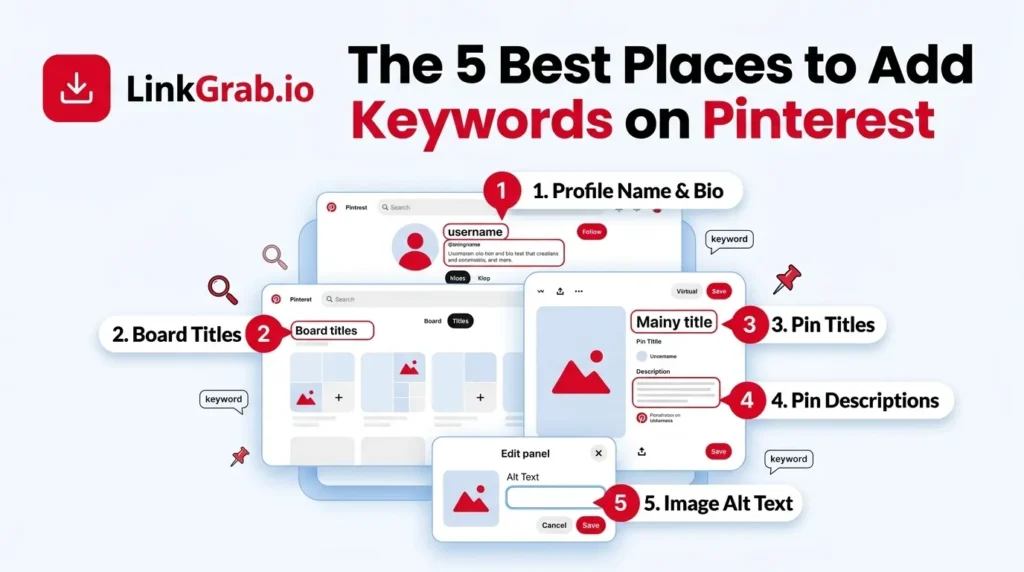
1. Pinterest Profile Name & Bio (Often Overlooked Goldmine)
Your profile is your homepage. Make it keyword-rich.
- Name field: Instead of just “Sarah’s Kitchen,” try “Sarah’s Kitchen | Easy Weeknight Recipes & Meal Prep”
- Bio/About section: Write 2–3 natural sentences that include your main keywords. Example: “Helping busy American families get healthy dinners on the table fast. 500+ easy recipes, meal prep guides, and budget-friendly ideas.”
This helps both people and the algorithm understand what you’re about.
2. Board Titles & Descriptions
Boards act like categories. Treat each one like a mini website.
- Board title: Use clear, searchable names (“Easy 30-Minute Dinners” instead of “Dinner Ideas”)
- Board description (up to 500 characters): Add 1–2 primary keywords naturally + a call-to-action. Example: “Quick and healthy dinner recipes perfect for busy weeknights. Save these easy meals the whole family will love!”
Create boards around your main keyword clusters. This helps Pinterest understand your expertise and recommend your pins more often.
3. Pin Titles (Most Important for Click-Through Rate)
Pinterest titles should be under 100 characters and front-load the main keyword when possible.
Good example:
“Easy One-Pan Chicken Dinner Recipe | 30 Minutes”
Better example:
“30-Minute One-Pan Chicken Dinner Recipe – Healthy & Family-Friendly”
Include power words like “easy,” “quick,” “best,” or numbers when they fit naturally.
4. Pin Descriptions (Your SEO Powerhouse)
This is where you can really go deep up to 500 characters.
Best structure:
- Start with the main keyword in a natural sentence
- Add 1–2 secondary keywords
- Include benefits or what the viewer will get
- End with a soft CTA (“Save this for later!” or “Tap to grab the full recipe”)
Example description:
“Looking for easy weeknight dinners? This 30-minute one-pan chicken recipe is healthy, family-approved, and perfect for busy moms. Includes make-ahead tips and budget swaps. Save this pin for your next meal prep!”
5. Bonus Spots Most People Miss
- Text overlay on the pin image (keep it readable and keyword-focused)
- Rich Pins (for product pins – add structured data with keywords in titles/descriptions)
- Idea Pins and video descriptions (newer formats still benefit from keyword-rich text)
Pro Tips That Separate Average Accounts from Top Performers in 2026

- Update old pins. Go back and refresh the titles and descriptions on your best-performing pins from 2024–2025. Many creators see big lifts.
- Stay natural. Keyword stuffing gets ignored (or penalized). Write for humans first, search engines second.
- Be consistent. Use similar keyword themes across related boards and pins so Pinterest sees you as an authority.
- Mobile-first. Most US users are on mobile. Keep titles punchy and descriptions scannable.
- Seasonal + evergreen mix Use Pinterest Trends to catch rising topics, but keep evergreen content (like “budget meal ideas”) as your foundation.
- Track what works in Pinterest Analytics, watch which keywords drive the most impressions and saves. Double down on winners.
How LinkGrab.io Makes Your Pinterest Workflow 10x Easier
Once your pins and boards are fully keyword-optimized, the next challenge is actually using all that great content, especially when you want to save videos or high-quality images from Pinterest for your own projects, campaigns, or repurposing.

That’s where LinkGrab.io shines.
LinkGrab works as a Video downloader from Pinterest. Whether it’s a video or an image, with the help of LinkGrab, you can download Pinterest videos and images easily and in the highest possible quality with just one click.
Here’s exactly what LinkGrab lets you do:
- Download any Pinterest video in crystal-clear HD quality instantly
- Save high-resolution images from pins in seconds
- Organise, filter, and export your downloaded files for easy access later
Thousands of US creators and marketers use LinkGrab to save hours every week. Instead of struggling with low-quality saves, broken links, or complicated workarounds, you get professional-grade downloads directly from Pinterest, whether you’re pulling your own optimised content or researching competitors.
Final Thoughts: Start Optimizing Today
Learning how to add keywords to Pinterest isn’t complicated; it just requires consistency and the right placement. Focus on your profile, boards, and every pin you create. Do the keyword research first, then apply what you learned.
Within a few weeks of intentional optimization, most US creators notice:
- More impressions
- Higher savings rates
- Increased traffic to their websites or shops
Pinterest rewards creators who show up consistently with helpful, keyword-aligned content. You’ve got this.
Now go open Pinterest, pick your first board, and start adding those keywords.
Which niche are you creating for? Drop a comment below. I’d love to hear your biggest Pinterest goal for 2026!
Ready to level up your Pinterest game even more?
Try LinkGrab today at link-grabber.com and start extracting, organizing, and exporting your optimized Pinterest links in seconds. Your future self (and your analytics) will thank you.
Frequently Asked Questions
-
How many keywords should I use in one Pinterest pin description?
You don’t need to stuff your description with dozens of keywords. The sweet spot in 2026 is 3–6 natural keywords per pin. Focus on 1 primary keyword in the first sentence and 2–4 supporting long-tail keywords throughout the description. Pinterest’s algorithm prefers relevance and readability over quantity.
-
Can I add keywords to Pinterest Idea Pins and video pins?
Yes! Idea Pins and video pins are excellent for keyword optimization. Use the title, description, and on-screen text to include your target keywords. Many creators are getting massive reach in 2026 by optimizing Idea Pins with keywords like “easy weeknight dinners” or “budget home office ideas.
-
What’s the difference between Pinterest keywords and Google keywords?
Pinterest keywords are more visual and intent-driven. People on Pinterest search for ideas and inspiration (“cozy fall outfits”), while Google searches are often more transactional (“buy winter jacket”). Pinterest favors longer, descriptive phrases and seasonal trends.
-
Does Pinterest penalize keyword stuffing in 2026?
Yes. Overstuffing keywords (repeating the same phrase unnaturally) can hurt your reach. Pinterest’s algorithm in 2026 is smarter than ever and favors natural, helpful language. Always write for humans first if it sounds spammy to you, it will to Pinterest too.
-
How often should I update old pins with new keywords?
It’s highly recommended to refresh your top-performing pins every 3–6 months. Update titles and descriptions with fresh long-tail keywords and trending phrases. Many creators see a 30–50% boost in impressions after refreshing older content.
-
Can I optimize Pinterest pins for both mobile and desktop users?
Yes. Pinterest is used mostly on mobile, but desktop users still matter. Keep titles short and punchy (under 60–70 characters) and descriptions easy to scan. Avoid cramming too much text mobile users should understand the value in the first 2 lines.