Quick Answer:
Pinterest monthly views are decreasing in 2026 primarily because of the TransActV2 algorithm update, which now analyzes up to 16,000 past user actions (up from 100) to predict behavior meaning stale content, mass repinning, and keyword stuffing are now actively penalized. Seasonal dips, shadow bans, viral pin decay, and the new “Visit Site” button change are additional contributing factors.
If you’ve logged into Pinterest recently and noticed your monthly views in a freefall you’re not overreacting. Thousands of creators, bloggers, and e-commerce brands across the US are watching their numbers crater. Some have reported drops of 60–95% overnight.
This isn’t a glitch. It’s not a phase. And it’s definitely not bad luck.
In this guide, we’ll break down every real reason your Pinterest monthly views are decreasing, what each one actually means for your reach, and exactly how to fix it starting today.
Table of Contents
What Do Pinterest Monthly Views Actually Measure?
Before diagnosing the problem, it helps to understand what this number really is.
Pinterest monthly views represent how many times your published pins and pins from your claimed domain appeared on screen in the past 30 days. This includes pins showing up in home feeds, search results, and related pin suggestions.
Here’s the critical nuance most creators miss: monthly views ≠ traffic, and they ≠ conversions. A drop in views doesn’t automatically mean your Pinterest strategy is failing. An account can lose 30% of its monthly views and still see website traffic increase because the remaining views are hitting higher-intent users.
That said, a sustained or sudden drop absolutely deserves investigation. Let’s look at the real culprits.
The 7 Real Reasons Your Pinterest Monthly Views Are Decreasing
1. The TransActV2 Algorithm Update The 2025 Earthquake
This is the dominant cause for most US creators experiencing sudden, massive drops since February 2025.
Pinterest rolled out TransActV2, its most advanced AI recommendation system ever. The difference is staggering:
| Before TransActV2 | After TransActV2 |
| Analyzed last 100 user actions | Analyzes up to 16,000 user actions |
| Recency-based ranking | Predictive behavior modeling |
| Favored viral repins | Favors fresh, original pins |
| Static images ranked equally | Video and shopping content prioritized |
The system uses a “Next Action Loss” function meaning Pinterest now predicts what users will want rather than just what they clicked on last week. Pinterest’s own A/B testing showed +13% recommendation accuracy and 11% fewer irrelevant pins as a result.
What got crushed: mass repinners, bulk-upload accounts, keyword stuffers, and anyone heavily relying on repins from older content. If your account relied on strategies that worked in 2022–2023, TransActV2 likely flagged you as a low-quality signal source.
The fix: Audit your last 90 days of pins. Remove low-quality, repetitive, or bulk-uploaded content. Shift to original pin graphics (minimum 1–3 fresh pins per day), and begin producing video pins for your top-performing topics.
2. Seasonal Dips The Most Overlooked (and Most Common) Cause
Seasonality explains a huge portion of “mysterious” drops that feel alarming but are completely normal.
Pinterest is heavily used for planning weddings, home decor, recipes, fashion, holidays. This means user behavior is deeply cyclical:
- Summer (June–August): Significant drop in active users, especially in the US. Parents are offline, vacations are happening, routines are disrupted.
- Back-to-school (late August): Brief activity surge, then leveling off.
- Winter holidays (Nov–Dec): Spike in holiday content, but non-seasonal accounts get deprioritized.
- January: Post-holiday hangover many accounts see their lowest monthly view numbers of the year before a recovery in February.
If your niche is home, food, parenting, or lifestyle, you are especially susceptible to these swings. The key diagnostic: compare the same month year-over-year, not just month-over-month.
The fix: Build a 6-month editorial calendar that plans seasonal content 45–60 days ahead of when users start searching. Pair seasonal pins with evergreen content to stabilize your baseline.
3. Viral Pin Decay The Spike You Can’t Sustain
Had a pin blow up a few months ago? That viral spike likely inflated your monthly view baseline and now that the pin has run its course, your stats look like they collapsed even if your underlying account health is the same.
Pinterest pushes pins that perform well to new audiences, which creates a temporary surge. But this distribution slows naturally over time, especially as newer pins compete for the same placements.
The deceptive part: your account didn’t get worse. Your baseline just became visible again.
The fix: Identify what made that pin perform. Was it the design? The keyword? The topic? Then create 3–5 new pin variations for the same URL using different visuals, hooks, and formats. Pinterest explicitly rewards fresh graphics pointing to high-performing URLs.
4. A February 2025 Deindexing Glitch Yes, This Was Real
Compounding the TransActV2 rollout, Pinterest experienced a technical glitch in February 2025 that accidentally deindexed a large number of website-linked pins making them invisible in search and discovery feeds entirely.
Pinterest moderators confirmed the issue, and reports flooded Reddit from US bloggers and small businesses who saw impressions vanish literally overnight with no changes to their own accounts. One creator saw visitors drop from 50,000 to 20,000 in a single day.
The fix: Check if your linked pins are still discoverable. Search for your own pin titles on Pinterest. If top-performing pins don’t appear, re-save fresh versions of those pins to relevant boards, and verify your website is still properly claimed in your Pinterest Business account settings.
5. The “Visit Site” Button Change A Hidden Traffic Killer
Pinterest quietly changed how users access linked websites. Previously, clicking the pin image took users to the destination URL. Now, a separate “Visit Site” button sits below the pin and if Pinterest’s algorithm determines your landing page is low quality, it actively de-emphasizes this button.
This change disproportionately affects US businesses that drive Pinterest traffic to blog posts or e-commerce pages. Fewer users notice the button, fewer click through, engagement signals drop, and the algorithm deprioritizes the pin further. It becomes a self-reinforcing decline.
The fix: Audit your landing pages. Make sure Pinterestbot is not blocked in your robots.txt, all linked URLs are live and load quickly, and your pages provide genuine value. Consider linking to your highest-quality long-form content rather than shallow landing pages.
6. Content Saturation and Increased Competition
Pinterest has grown significantly as a marketing channel, especially in the US. More creators and brands than ever are pinning in every niche which means the same audiences are being competed for by a much larger supply of content.
This isn’t a reason for panic. It’s a reason to sharpen your differentiation. Generic lifestyle pins, stock-photo-based content, and recycled ideas are increasingly invisible. The algorithm is getting better at identifying originality, and users are too.
The fix: Invest in original photography or distinctive graphic design. Use your brand’s unique perspective, data, or expertise as the hook. Generic content is getting commoditized, specific, high-expertise content is what now earns distribution.
7. You Might Be Shadow Banned
A Pinterest shadow ban means your content is technically live but receives near-zero distribution. Pins don’t show in search, feeds, or suggestions but Pinterest won’t notify you.
Common triggers for shadow bans in 2025 include: posting too many pins too quickly, using banned or spammy keywords in pin descriptions, linking to flagged domains, and using the same image across multiple pins repeatedly.
Some creators have described losing 95% of impressions with no policy violation notice which matches shadow ban behavior.
The fix: Reduce your daily pin volume to 10–15 pins maximum. Review your pin descriptions for keyword stuffing. Check your linked domain against Pinterest’s spam filters. If you suspect a shadow ban, take a 3–5 day break from posting, then resume with fresh, high-quality original content only.
What Pinterest Monthly Views Are NOT Telling You
This is where most creators make their biggest mistake: treating monthly views as the primary success metric.
Monthly views measure reach not results. Here’s what you should actually be tracking:
| Metric | What It Measures | Why It Matters More |
| Outbound clicks | How many people visited your site | Actual traffic driver |
| Saves | How many users bookmarked your pin | Long-term distribution signal |
| Engagement rate | Saves + clicks ÷ impressions | True resonance indicator |
| Pinterest referral traffic (in GA4) | Sessions from Pinterest | Revenue-relevant data |
| Click-through rate per pin | Quality of individual pins | Content optimization signal |
An account can drop from 2 million to 800,000 monthly views and increase revenue if the remaining 800,000 views are more targeted and higher intent. Chasing raw view counts leads to the exact behaviors (mass pinning, keyword stuffing, broad content) that TransActV2 now penalizes.
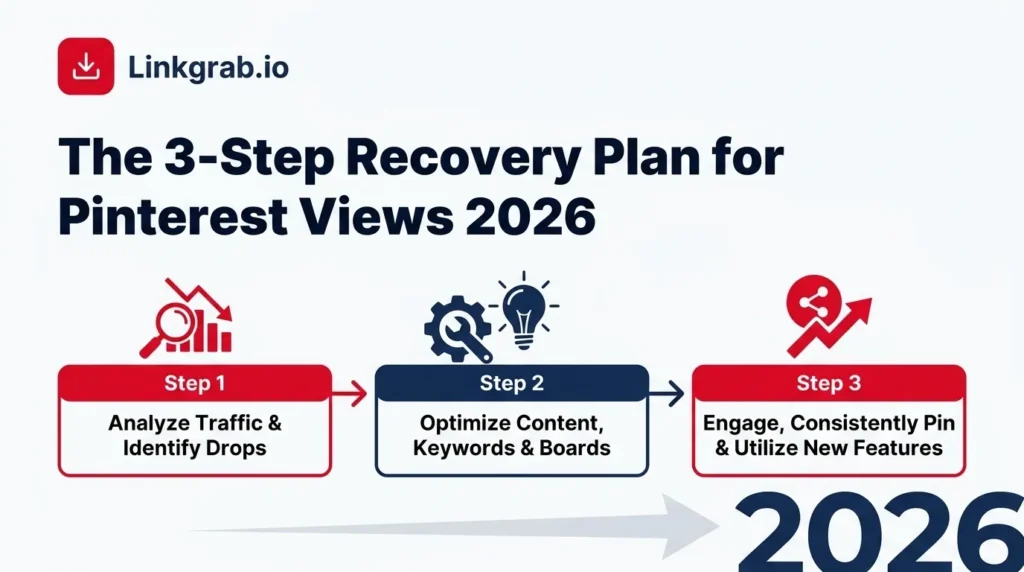
The 3-Step Recovery Plan for 2026
Step 1: Diagnose Before You Act
Before changing anything, spend one week pulling data:
- Log your monthly views for the past 6 months (screenshot your Pinterest analytics dashboard).
- Compare the same period year-over-year to separate seasonal dips from structural problems.
- Identify your 10 highest-performing pins (by outbound clicks, not just views).
- Check if those top pins are still indexed and discoverable via Pinterest search.
- Look at your Google Analytics 4 Pinterest referral traffic to see if the view drop correlates with a traffic drop or if traffic has held steady.
If your traffic held steady but views dropped: this is likely normal algorithmic reshuffling not a crisis. If both traffic and views dropped: you have a structural problem to fix.
Step 2: Clean Up Your Account
This is the most important step most creators skip because it feels counterintuitive deleting pins feels like going backwards.
- Archive or delete low-performing pins (under 5 outbound clicks in 90 days) these are dead weight dragging your account’s quality signal down.
- Remove duplicate or near-duplicate pins pointing to the same URL.
- Audit your boards: delete irrelevant boards, consolidate overlapping ones, and make sure every board has a clear, keyword-rich description.
- Verify all linked URLs are live, fast-loading, and high quality.
Step 3: Rebuild With 2026 Best Practices
Now rebuild your content cadence with what Pinterest’s current algorithm rewards:
Fresh original pins daily: Create 1–3 new pin graphics per day. Use Canva, Adobe Express, or a professional designer. Do not recycle the same template endlessly TransActV2 detects visual repetition.
Prioritize video pins: Video pins consistently receive 2–3x the saves and clicks of static images. Even simple 15–30 second clips with on-screen text outperform static graphics in most niches.
Keyword-optimize your descriptions naturally: Write descriptions the way you’d explain a pin to a friend including the main topic, a secondary descriptor, and what someone will find when they click. Avoid comma-separated keyword lists; they now trigger spam filters.
Pin on a consistent but sustainable schedule: 2–5 fresh, unique pins per day is the current optimal sweet spot. Avoid bulk-uploading or scaling beyond 10 total pins a day, as high posting velocities instantly flag automated spam triggers under TransActV2.
Use Pinterest Trends: The Pinterest Trends tool shows US search volume by keyword. Pin content 4–6 weeks before a trending topic peaks not after.
How Linkgrab.io Helps You Recover Pinterest Traffic
Adapting your account to a video-first strategy manually is tough. Under the TransActV2 algorithm update, video pins consistently capture 2–3x more distribution footprint than static images.
Linkgrab.io makes it seamless to capture and study high-performing video creative. By letting you download top-performing niche videos instantly to your local drive, it gives you a professional-grade framework to dissect winning hooks, transitions, and pacing templates in your editing software to reverse-engineer success.
When your Pinterest monthly views drop, the first question isn’t “how do I get views back” it’s “which specific pins and boards are worth investing in.” That’s the layer of clarity Linkgrab.io brings to your Pinterest strategy.
What to Do Next
- Pull your Pinterest analytics today to compare month-over-month AND year-over-year before concluding.
- Check your top 10 pins are still indexed search for them directly on Pinterest.
- Start the 3-step recovery plan above: diagnose, clean, rebuild.
- Utilize Linkgrab.io to pull high-performing video pins within your niche, allowing you to study successful visual frameworks and build optimized, high-impact video canvases.
Looking to save high-performing Pinterest video content for deep creative research or offline reference? Our Pinterest video downloader lets you save any video asset to your device in seconds, making it easier to study winning content formats.
Frequently Asked Questions
Is a drop in Pinterest monthly views always bad?
No. Monthly views measure raw reach, not engagement quality or revenue. Many accounts see views drop while outbound clicks and website traffic increase because the algorithm is showing your pins to more relevant users.
How long does it take to recover Pinterest traffic after an algorithm update?
Based on creator reports following the 2026 TransActV2 rollout, accounts that adapted their strategy (fresh pins, video, reduced bulk posting) saw recovery within 6–10 weeks. Accounts that made no changes continued declining.
Does posting more pins help increase monthly views?
Not in 2026. TransActV2 penalises accounts that post more than 25 pins per day. Consistency (10–15 quality pins per day) outperforms volume-based strategies.
What is a Pinterest shadow ban and how do I know if I have one?
A shadow ban means your content receives near-zero distribution without any notification. Signs include pins not appearing in your own keyword searches, impressions dropping to near zero despite active posting, and engagement disappearing entirely. A short posting break followed by fresh, original content is the most commonly reported recovery method.
Should I delete low-performing pins?
Yes. Low-performing pins with no clicks or saves over 90 days act as quality signals that drag your entire account’s distribution score down. Archiving or deleting them is a recommended cleanup step before rebuilding.
1 thought on “Why Are Your Pinterest Monthly Views Decreasing? (Causes + Fixes for 2026)”